Featured tutorial
Build and organize your TangoDJ library
See how the Library Wizard imports your music, cleans up metadata, and prepares your collection for DJing.
TangoDJ is a Windows and macOS desktop app built around the way tango DJs actually work.
If it doesn’t fit your workflow, email us within 14 days for a full refund.
See how TangoDJ helps you prepare your library and stay in control during the milonga.
Featured tutorial
See how the Library Wizard imports your music, cleans up metadata, and prepares your collection for DJing.
New feature
Browse historical tango recordings and see perfect or partial matches from your own library.
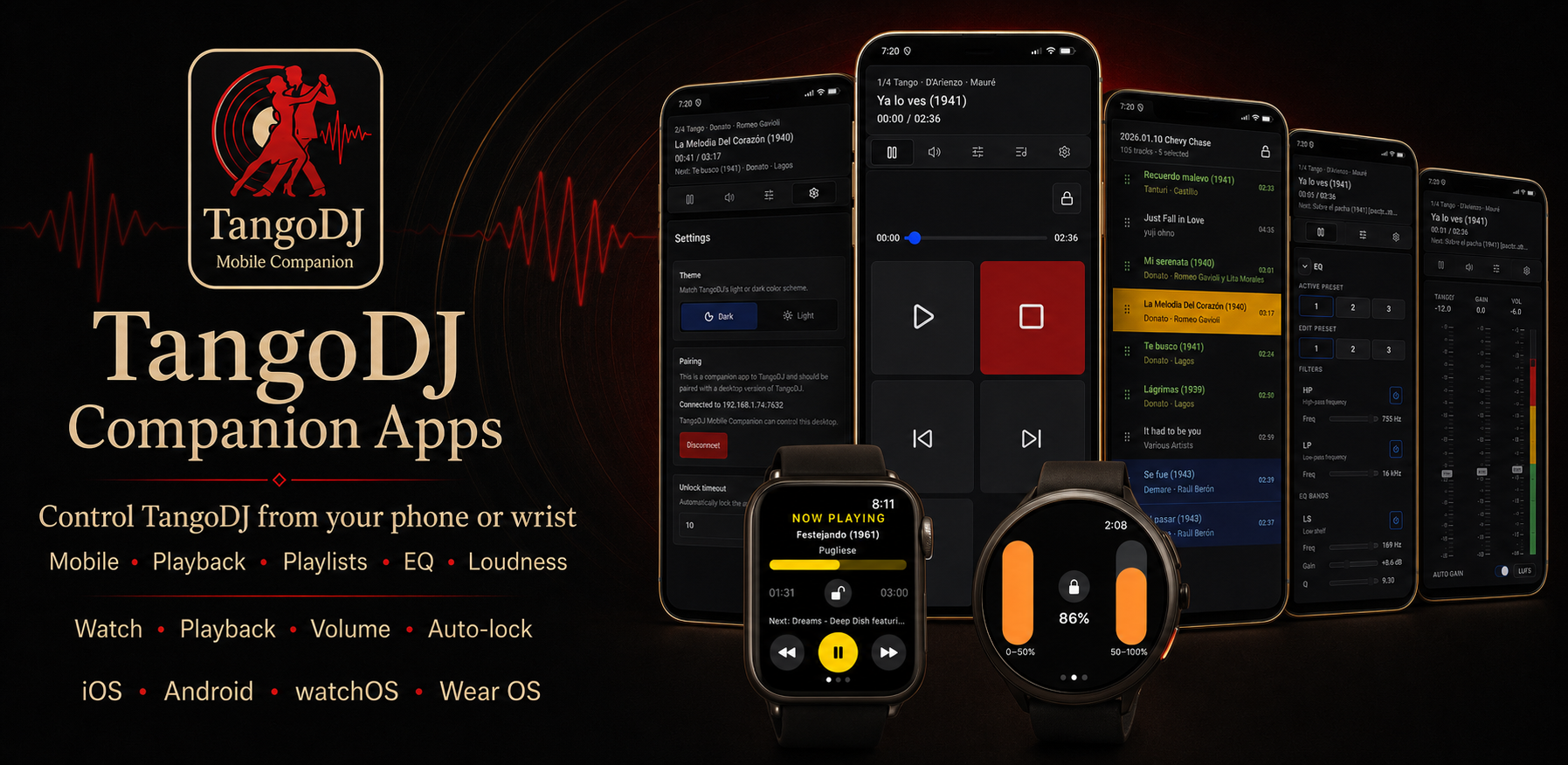
See the Mobile and Watch Companion apps remote-controlling TangoDJ.
Put live playback and sound controls under your fingers with MIDI mapping.
Download TangoDJ Mobile and Watch Companions for iOS/Android/WatchOS/Wear OS devices. Included in your TangoDJ purchase.
Purpose-built for tango
TangoDJ is intentionally focused. Here is the quickest way to know whether it matches how you work.
A strong fit
A different fit
Faster preparation, safer live control, and a cleaner path from your music folders to a finished milonga playlist.
Use the Library Wizard, Recordings Catalog, Smart Folders, ratings, fast tagging, and search to understand and organize your music.
Send, replace, move, and set the next tanda while the playlist stays organized around tango structure.
Use Master presets, Auto gain, clip prediction, filters, parametric EQ, compressor, and VST3 effects.
Audition the next tanda, replacement tracks, or cortinas without changing main playback or the audience display.
See current playback, next track, stop markers, analysis status, timing projections, and tanda issues.
Lock the playlist or player, mark stop-after moments, and keep fallback tracks ready.
“Compared to other playback programs, where you have to piece everything together yourself and always end up feeling a bit under pressure, TangoDJ is a real relief to use throughout the evening.”
Scroll through the workspace, then select an image to enlarge it.
Seventeen years ago I started DJing milongas and quickly hit a wall: every DJ program was built for generic playlists, not tandas, not cortinas, not tango flow.
So I built my own tool. I used it to DJ around the world, and DJs kept asking, “What are you using?”
After changing laptops, I rebuilt it from the ground up. TangoDJ is that modern version: a rock-solid, tanda-first system that makes milonga DJing simpler, safer, and more enjoyable.
— Rick
01
For an empty library, TangoDJ opens a short onboarding guide and points you to the Library Wizard. Add watched music locations or import playlists from your current DJ app.
02
Review orchestra, singer, genre, and title metadata, compare your collection with the Recordings Catalog, and save favorite tag values for fast editing.
03
Assemble playlists, preview privately, watch the schedule, adjust the next tanda, tune the Master output, and show dancers what is playing.
Library Wizard
Add watched music locations, import existing DJ libraries or playlists, map metadata sources, and review orchestra, singer, genre, and title values.
Recordings Catalog
Browse an offline catalog of 9,684 recordings from 33 orchestras, then open perfect or partial matches from your own collection.
Fast metadata tagging
Save the orchestras, singers, and genres you use most, then apply them to one track or a large selection from the Tag menu.
Smart Folders
Watch music folders on disk and combine them with saved searches. New, changed, and missing files are reflected automatically or on demand.
Ratings and Favorites
Rate tracks, sort any column, and collect selections in existing or new Favorites folders.
Powerful search
Search by title, orchestra, singer, genre, tags, rating, year, BPM, and other numeric ranges.
Tempo, pitch, and BPM
Detect BPM, change tempo and pitch from the player, and save per-track values for later.
Tanda first
Create tandas from selected tracks, keep complete groups together, and mark cortinas so the playlist behaves like a milonga.
Playlist operations
Send music to the next tanda, last tanda, end of playlist, or after a selected tanda.
Playlist indicators
Compact row markers show what is playing, what comes next, where playback stops, and whether analysis is ready.
Playback safety
Lock the playlist, lock the player, set stop-after markers, and keep fallback tracks ready.
Private preview
Send main output to speakers and preview output to headphones without changing playback or the Info Display.
Master panel
Use gain, filters, EQ, compressor, Auto gain, clip prediction, spectrum view, presets, and VST3 effects.
MIDI remote control
Map MIDI knobs, faders, pads, and buttons to playback, playlist actions, Master presets, and sound controls.
Mobile Companion
Pair the companion app and control playback, playlists, Master sound, loudness, EQ, and custom controls.
Info Display
Open a separate audience window, blackout it when needed, and choose or customize display themes.
Themeable display
Copy a built-in Info Display theme and edit its local HTML, assets, and optional JavaScript.
Per-genre colors
Add your own genre names and choose separate colors for light and dark themes, not only Tango, Vals, and Milonga.
Shortcuts and layout
Toggle panels, maximize what you need, switch theme and language, and assign shortcuts from Settings.
Backup and repair
Use automatic, session-end, and Pre-import backups, then validate and restore them from the backup manager.
TangoDJ was built for exactly that.
Yes. TangoDJ is purpose-built for Argentine tango events such as milongas, practicas, festivals, and marathons.
It is a strong fit when your workflow depends on tandas, fast playlist preparation, precise timing, and room-sound control. It is not aimed at general-purpose club DJing.
Yes. TangoDJ works offline. Internet is only needed for license checks.
Windows and macOS are supported, including Apple Silicon and Intel Macs.
MP3, FLAC, WMA, AAC, OGG, M4A, AIFF, and APE are supported.
Yes. When you start with an empty library, TangoDJ opens a short onboarding guide and recommends the Library Wizard.
It adds watched music locations, imports existing DJ libraries and playlists, maps orchestra and singer tags, and helps clean up orchestra, singer, genre, and title metadata.
Yes. Import music folders, M3U/M3U8 playlists, and libraries from VirtualDJ, Foobar2000, AIMP, Mixxx, and Apple Music.
It is an embedded offline catalog of 9,684 historical tango recordings from 33 orchestras. Browse by orchestra, search or sort recordings, and open perfect or partial matches from your TangoDJ library.
Yes. Keep favorite orchestra, singer, and genre values in the Tag menu, add values from existing tracks, and apply them to a whole selection.
Yes. Add arbitrary genre names and choose a different color for each in the light and dark themes.
Yes. Choose 1, 2, 4, or 8 file-processing workers in Settings to balance speed against CPU and disk usage.
Yes, when the files have usable genre and artist tags.
During import, build nested folders from tags such as orchestra, genre, album, year, or custom fields. You can also preserve source folders or collect everything in one folder.
Smart Folders are saved searches that can also watch music folders on disk and stay current as files and metadata change.
Search by title, orchestra, singer, genre, file information, or custom tags. Numeric filters support comparisons and ranges for values such as rating, year, and BPM.
Yes. Even thousands of music files can be edited in bulk.
Yes. Export playlists and library results when you need to archive, move, or share material.
Yes. You can use any audio device for preview.
Yes. Main and preview outputs can be changed in real time.
TangoDJ skips configured silence, inserts a predefined gap, fades cortinas when you choose, and supports custom start and stop points per track.
Lock the player while editing the playlist, lock the whole playlist, and set stop-after markers for controlled endings.
Before importing, TangoDJ saves pending changes and creates a retained Pre-import backup that you can restore from the backup manager.
Yes. Search actions and assign the shortcuts you use during preparation or live playback.
Yes. Map controllers to playback, volume, presets, EQ, filters, playlist commands, locks, and custom controls.
Playback, playlists, Master sound, loudness, EQ, and custom controls after pairing with the desktop app.
Yes. Panels can be resized, toggled on or off, and swapped for preparation or live use.
Eight Master preset slots can store filters, EQ, compressor, Auto gain, and VST3 settings. Spectrum feedback and clip prediction are included.
Yes. Saving and recalling EQ presets is instant, even during a track.
No. TangoDJ is a one-time purchase with a perpetual license and updates within the same major version.
A perpetual TangoDJ license and all updates within the same major version you purchased.
One machine at a time. Deactivate the old machine before activating another. The license covers both macOS and Windows.
Email us within 14 days of purchase for a refund.
Write to info@bukdugroup.com. We usually reply within a day.
Yes. TangoDJ is actively maintained and updates are shipped frequently.
$199 perpetual license for macOS and Windows.
Questions? Write to info@bukdugroup.com.